
Support topicsGetting started
Send a certified letter
Upload a PDF, add the addresses, and pay. We print your letter and send it by USPS Certified Mail.
Last updated October 24, 2026
You can send one certified letter in a few minutes. We print it, put it in a certified envelope, and hand it to USPS for you.
Before you begin
- Your letter as a PDF, up to 4.5 MB and 60 pages. See Prepare your PDF.
- The recipient's full mailing address, including any apartment or suite number.
- A credit or debit card.
Send your letter
Here's the form with a letter ready to send:
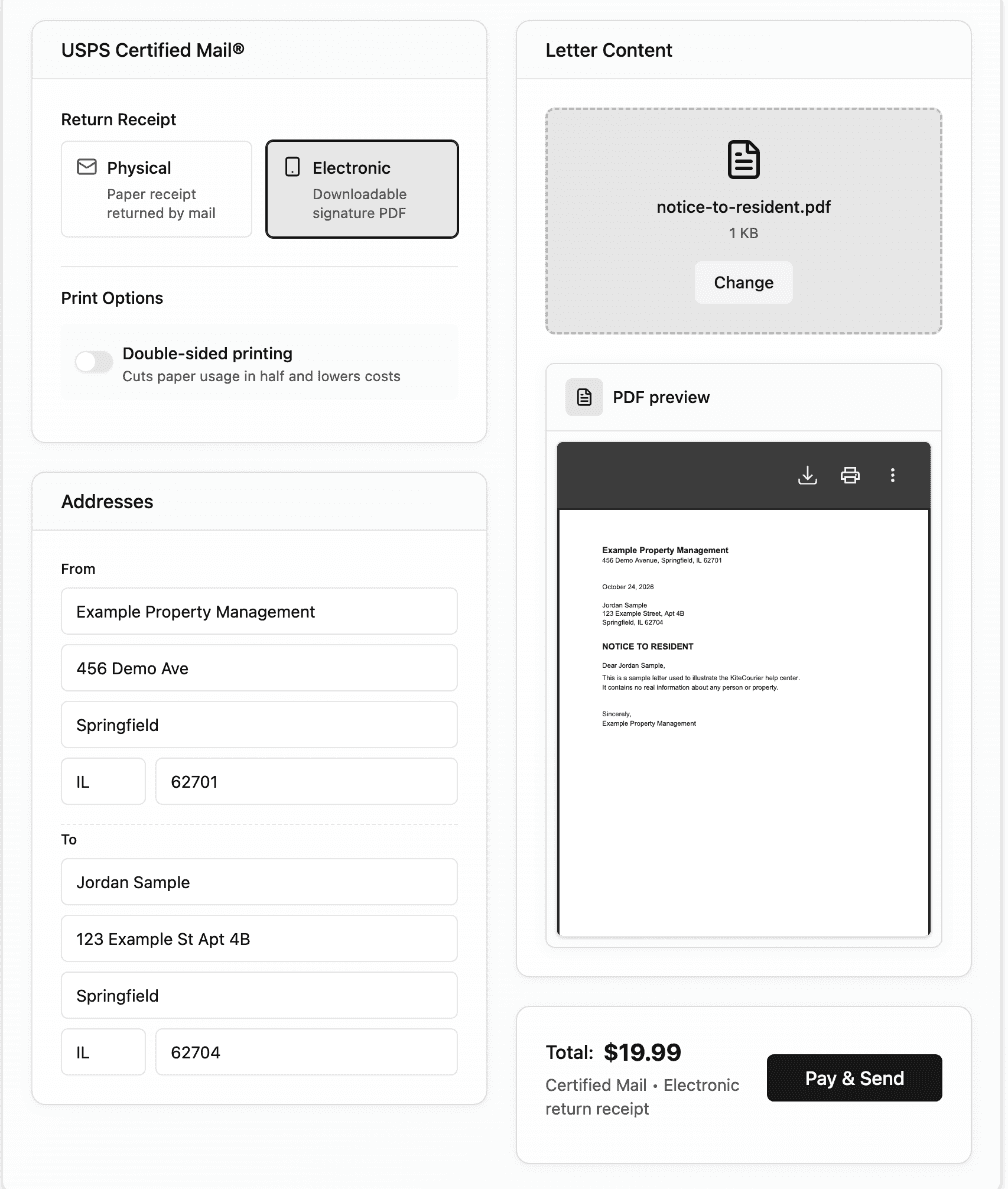
- Sign in. The Single Letter page opens. (You can also find it in the menu under Send Mail.)
- Under Return Receipt, keep Electronic selected. It includes an electronic return receipt with the recipient's signature. See Return receipts and proof of delivery.
- Optional: turn on Double-sided printing. It uses half as many sheets, which keeps longer letters under the oversize fee.
- In the Addresses card, fill in From (your return address) and To (the recipient).
- Put an apartment or suite number on the street line, for example “11 Main St Apt 630.”
- Use the 2-letter state code and a 5-digit ZIP code.
- In the Letter Content card, upload your PDF. Check the preview to make sure it's the right file.
- Check the total, then select Pay & Send.
- Pay for the letter:
- To use a saved card, select it, then select Pay with Selected Card.
- To use a new card, enter it and select Pay & Send. Turn on Save payment method if you want to use it again.
When the letter is accepted, you'll see Letter sent successfully! Select View letter to open it on your Letters page.
Your card is charged only once the letter has been accepted for printing. If something goes wrong before then, you aren't charged.
What happens next
- For the first 3 hours, you can still cancel the letter from your Letters page for a full refund. See Cancel a letter and get a refund.
- Within about 3 business days, we print your letter and hand it to USPS. Tracking updates start once USPS scans it.
- Most letters are delivered about 6 business days after you send them. See How long certified mail takes.
If something goes wrong
- The address is rejected: check the street, ZIP code, and apartment number. See Format addresses correctly.
- The PDF won't upload: see Prepare your PDF.
- Your card is declined: see Pricing and payment.